Tribe log to Discord
Every new log line posted within seconds as a colour-coded embed, with a cropped picture of the log so you can double-check the text.
ASA Tribe Log Bot watches the Tribe Log inside your running ARK: Survival Ascended client and posts every new line to Discord — destroyed structures, killed tames, parasaur alerts, who's online. Raid pings and a voice-channel siren wake the tribe. Works on official PvP servers. Keep using your PC while it runs.
3-minute setup · Windows 10/11 · Steam, Epic & Microsoft Store versions · installer delivered with your license
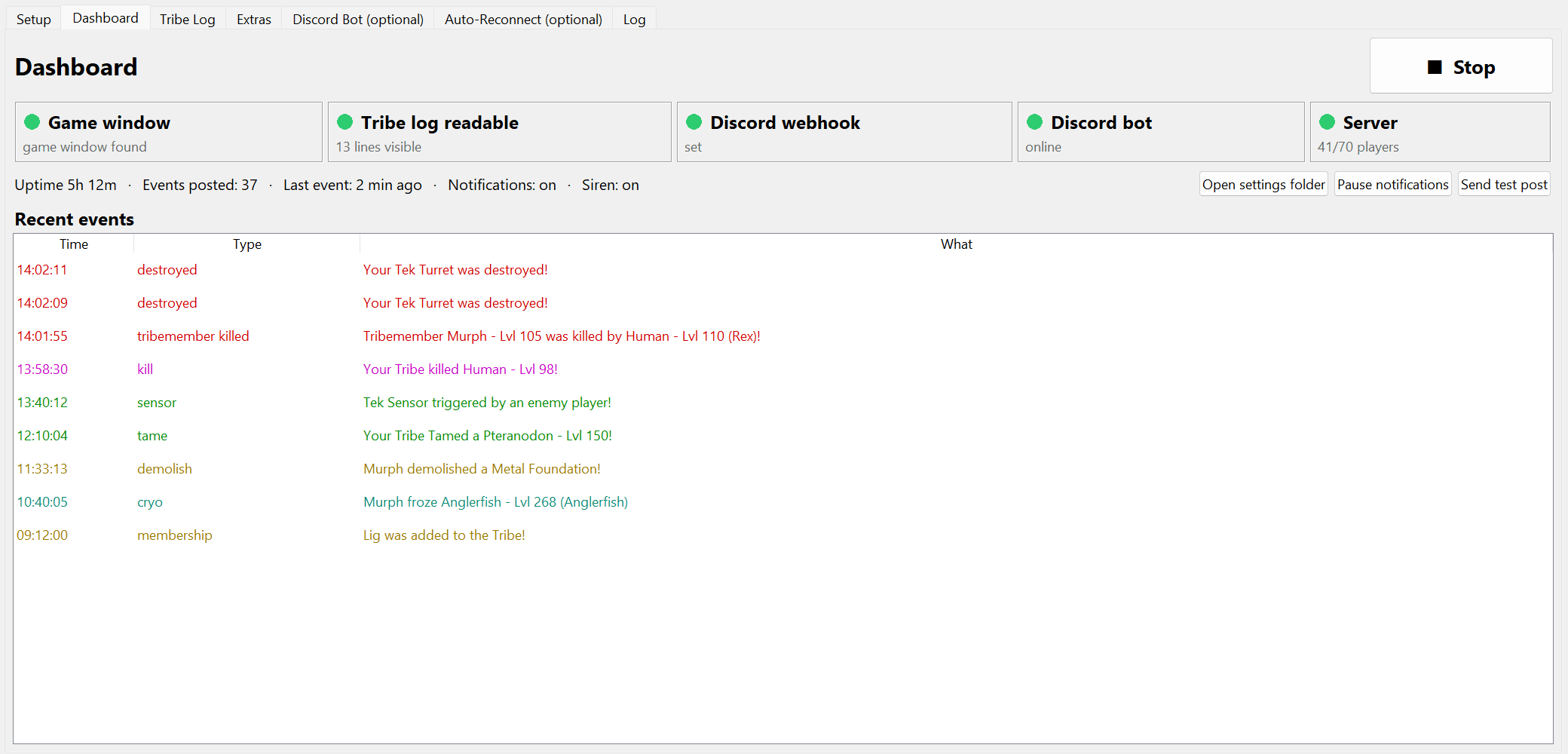
Every log line becomes a colour-coded embed with a cropped picture of the in-game log. Serious events — structures destroyed, tribemates killed, sensors tripped, parasaur alerts — can go to a separate #raid-alerts channel with an @mention.
When things pile up ("3 deaths within 5 minutes") the bot joins a voice channel and plays a siren. Sleeping tribemates wake up. Raid spam collapses into one message with a counter instead of flooding the channel.
Windowed Fullscreen, HUD 100%, Tribe Manager → LOG tab. Leave it open. Other windows can sit on top.
Channel → Edit → Integrations → Webhooks → New. That's the only Discord setup needed.
The screen dims, you draw a rectangle, and a preview shows exactly what the bot reads.
New lines show up in Discord within seconds. Tick 'start automatically' and forget about it.
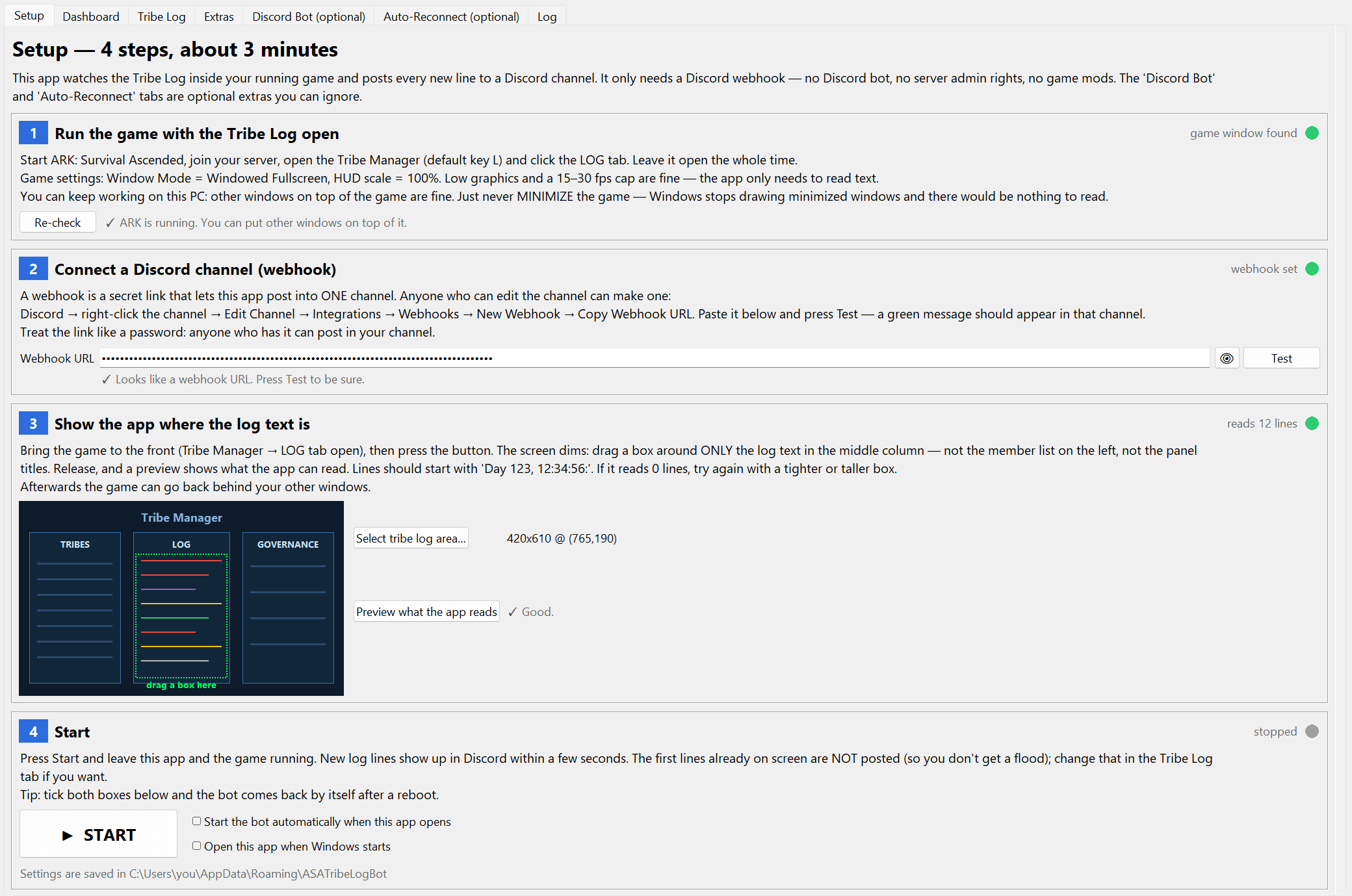
The bot reads the game window directly through Windows Graphics Capture, even when your browser or Discord covers it completely.
Don't minimize the game — Windows stops drawing minimized windows. Cover it, alt-tab, or park it on a second monitor.
Low graphics, 15 fps cap, and ~2 seconds of light OCR per check. An old PC or a laptop is enough.
Consoles have no tribe log API, so every raid-alert tool has been PC-only. ASA Tribe Log Bot reads the Tribe Log off your console's picture — through a cheap USB capture card, Remote Play, or a tribemate's Discord stream — and posts it to Discord exactly like it does for PC tribes.
Xbox · PlayStation · official PvP & Small Tribes
Every new log line posted within seconds as a colour-coded embed, with a cropped picture of the log so you can double-check the text.
No mods, no RCON, no server access. It reads the Tribe Log inside your game client — the only way that works on official PvP, Small Tribes and every unofficial.
Captures the game window directly, even with your browser or Discord on top. Just don't minimize the game.
The only ASA log bot that reads Xbox & PlayStation: run the console's HDMI into a cheap USB capture card and it reads the log the same way. Also reads Remote Play windows.
No ARK, console or capture card on the bot PC? Have a tribemate Go-Live the game in Discord — the app reads that stream window and posts the log. Pick from five capture sources.
@mention roles when destroyed / killed / sensor events pile up, and play a siren in a voice channel. Rules like '3 deaths within 5 minutes'.
Detects the parasaur alert icon on your HUD and posts a screenshot immediately.
New global-chat messages posted with a picture. Your own tribe's messages are filtered out.
A picture of your member list every few minutes, so the tribe knows who's on.
A full screenshot on a schedule — proof the bot is still in and nothing looks wrong.
Serious events to #raid-alerts, everything else to #log. Raid spam collapses into one message with a ×12 counter.
Relogs after a disconnect, relaunches the game if it closed, reopens the Tribe Log and reports the downtime.
/logbot mute, status, screenshot, siren, send chat messages into the game, plus /baby, /tekgen and /forcefield timers.
Battlemetrics status and player count, with an alert when the population climbs.
A 'still alive' post every day. Monitors are isolated and the engine restarts itself if anything crashes.
Four guided steps with green/red lights and a live preview of what the bot reads. No technical skills needed.
Your license key and the installer link arrive right after purchase; activate the key inside the app.
Xbox and PlayStation give tribes no way to export the tribe log — no API, no plugins, no app. But the log is on the console screen, and anything on screen can be read. Here are the three ways to get a console tribe log into Discord, cheapest first, and how to make the text read reliably.
There is no official API for the ASA tribe log. The only thing that works on official servers is reading the log from a running game client and posting it to a Discord webhook — here's how to do that reliably.
A log channel nobody reads at 3 AM isn't an alert. Here's the alert design that actually works for small tribes: routing, thresholds, pings, and a voice-channel siren.
Yes — official PvP, Small Tribes, PvE and unofficial servers alike. Official servers don't offer any API or webhook for tribe logs, so the bot reads the Tribe Log panel inside your running game client and posts what it sees. It needs a character logged in with the Tribe Log open.
The installer link comes with your license key right after purchase (email and the customer area). It is not distributed publicly.
By default the bot only captures the screen — it never injects anything into the game and never sends input. The optional auto-reconnect and chat-send features press keys like a macro would; they're off until you turn them on and are at your own risk under the game's rules.
Yes. The bot captures the game window directly, so your browser, Discord or work can be in front of it. The one rule: don't minimize the game, because Windows stops drawing minimized windows. A second monitor or a $5 HDMI dummy plug makes it completely invisible.
No — a webhook is enough for all posting. A Discord bot (free, 5 minutes to create) is only needed for slash commands and the voice-channel siren.
One PC per license, locked to that PC's hardware. You can release it from inside the app and activate a different PC any time — a second PC running at the same time needs a second license.
Nothing beyond the license. It runs on the PC that has the game open; a low-end PC at low settings and 15 fps is plenty.
Any. You select the log area yourself and the bot reads it with OCR; 1080p and up give the cleanest text.
Yes — on PC it reads the game window regardless of store (Steam, Epic, Windows/Xbox app). Auto-reconnect has a platform switch for the launch command.
Yes — this is the only ARK tribe log bot that reads consoles. There's no console software; instead you run the console's HDMI into an inexpensive USB capture card (the kind streamers use, ~$15–40) plugged into any Windows PC, then pick that device in the app and drag a box around the Tribe Log. Everything else — Discord posts, alerts, siren, @mentions — works exactly the same. You can also read an Xbox/PS Remote Play window on the PC with no capture card at all.
Five, all feeding the same reader: (1) the ARK window on the PC it runs on; (2) a Discord stream — a tribemate Go-Lives the game and the app reads that stream window, so the bot PC needs no ARK, console or capture card; (3) an Xbox/PS Remote Play window; (4) a console through a USB capture card; (5) the whole screen as a last resort. You pick the source in the app; each one shows its own short instructions.
Yes. Have someone stream ARK in a Discord voice channel (Go Live), open that stream on the PC running the app, Pop it Out into its own window, and choose the 'Discord stream' source. The bot reads the log from the stream and posts to your server — no game, console or capture card needed on the bot's PC. Higher stream resolution reads more reliably.